Howto use Cyberduck with Rackspace Cloud UK

If you are wondering howto use a graphical client like Cyberduck to access the Rackspace Cloud UK this is how you do it. We are going to use the Swift OpenStack support in Cyberduck to access the UK CloudFiles instance.

You first Open Cyberduck and Click on open connection :

In the Menu choose Swift (OpenStack Object Storage) and in Server field you specify :

lon.auth.api.rackspacecloud.com

and enter your Username and Api Key (in Password field) :
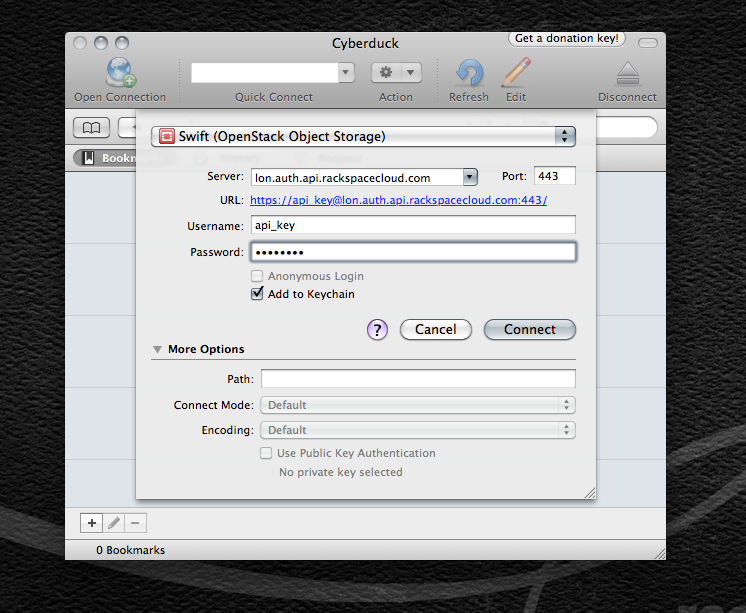
You should just be able to press connect to get going, if it is asking for a Password again in the next screen (which is to store in your Apple Keychain) just specify your API Key again in there.

  • http://twitter.com/carloallegretti Carlo Allegretti

    very useful informations! Thank you.

  • http://twitter.com/carloallegretti Carlo Allegretti

    very useful informations! Thank you.

  • Richieg261

    Enabling CDN doesn’t work on Rackspace UK account using latest version of Cyberduck.

  • Anonymous

    You are right unfortunately, probably need to have a bug filled upstream to cyberduck devs.

  • http://twitter.com/ottobyte Michael Otton

    Great! Finally my files are uploading!! Thank you very much

  • http://twitter.com/davidkocher davidkocher

    There is also a connection profile available at http://trac.cyberduck.ch/wiki/help/en/howto/rackspaceuk to simplify the setup.

  • dgi

    Excellent post, very helpful – I was about to give up!

  • Ryan

    You saved me about 10 hours of manual uploading. VERY HELPFUL!!!

  • Matt

    Thank you!

  • Jan

    thanks, worked for me exactly! Top!