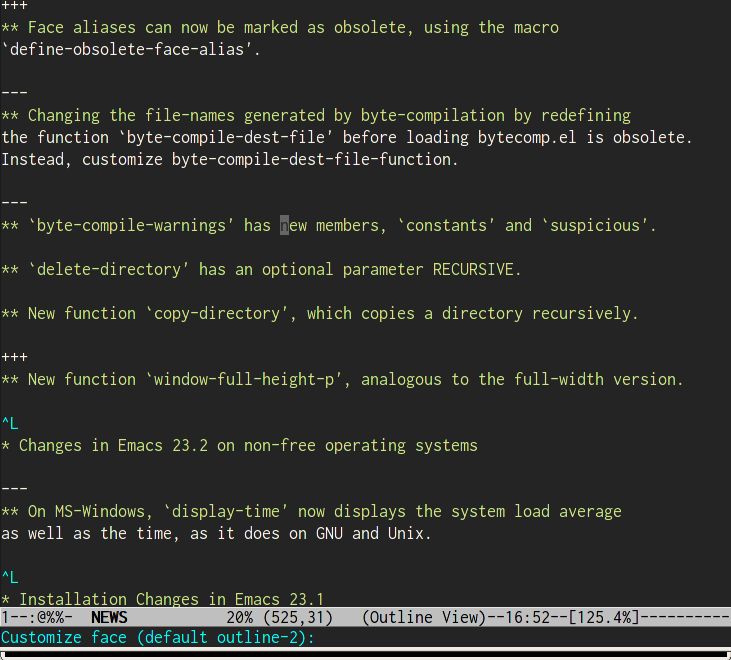
Customize face at point in Emacs

It’s probably interesting only for the hardcore Emacs users but the last CVS version of emacs (2009-12-17) get a nifty new improvement if you need to customize a face property.

If you point on the text where you want to customize it will detect it automatically which face point you are on and ask you if this is what you want to customize (after launching the command M-x customize-face). No guessing around with list-face-displays anymore.

I am just mentioning that because it does not seems to me mentioned in the CHANGES file.

  • http://panela.blog-city.com/ matt harrison

    This seems like it’s a halfway solution. It’s definitely an improvement over list-faces-display, but I guess I would prefer a show-face-mode. Wouldn’t that be easier those of us tweaking our color theme every time a new mode has it’s own colors?

  • anon

    either i’m misreading what you mean or you’re wrong and that has been there since at least emacs22

  • http://www.chmouel.com/ chmouel

    @anon it could be yes been there since a long time, I am surprise I just see that since I have done that customize-face list-face-display for a long time and I haven’t see that feature.

    @matt_harison yeah show face mode would actually awesome for customizing things…. usually when you do M-x customize mode-name author of the mode would list all the faces in its own category but a dynamic thing would be way better.

  • http://piyokun.googlepages.com piyo

    This feature seems to be in 22.3.

    Also another way I figure this out is use what-cursor-position, bound to C-x =. It is necessary to prefix this command with a C-u argument to get the extra information. The latter includes what faces are used on that character.

  • Pingback: Links 23/12/2009: OLPC XO 3.0 Concept Surfaces | Boycott Novell

  • Ivan Andrus

    What exactly do you mean by show-face-mode? Something like this?


    ;; Add (show-face-mode (" `" *show-face-mode-cur-face* "`")) to mode-line-format
    (defvar *show-face-mode-cur-face* nil)

    (defun update-current-face ()
    (setq *show-face-mode-cur-face*
    (and (get-char-property (point) 'face)
    (symbol-name (get-char-property (point) 'face)))))

    (defvar show-face-mode) ;; silence the byte compiler
    (define-minor-mode show-face-mode
    "Just puts face info in the mode-line"
    nil "" nil :global t
    ;; called every time it turns on or off, after toggling the mode
    (if show-face-mode
    (add-hook 'post-command-hook (function update-current-face))
    (remove-hook 'post-command-hook (function update-current-face))))

  • elflord

    Hello! What font and emacs theme you are using in that screenshot?
    Thanks for the answer in advance.

    • http://www.chmouel.com/ chmouel

      Hey,

      I am using Inconsolata-12 provided here this is my frame configuration by the way :

      (setq default-frame-alist '((font-backend . "xft")
      (font . "Inconsolata-12")
      (vertical-scroll-bars)
      (left-fringe . -1)
      (right-fringe . -1)
      (menu-bar-lines . 0)
      (tool-bar-lines . 0)
      ))